Email a 3D model to a client who has nothing installed
Cloud viewers give a client a link, a login and a viewer they have to learn, and the link stops working when the project account does. A file does none of that.
The problem with links
A hosted viewer lives on someone else's server: the client needs an account, the link expires or is revoked, and the model is only as private as that service. A single file is different. It sits in the email, in the project folder, on the site laptop, and it keeps working years later with the internet off.
What the client gets
- One .html file, typically a few to a few tens of megabytes.
- Opens by double-clicking, in Chrome, Edge, Safari or Firefox, on a laptop, tablet or phone.
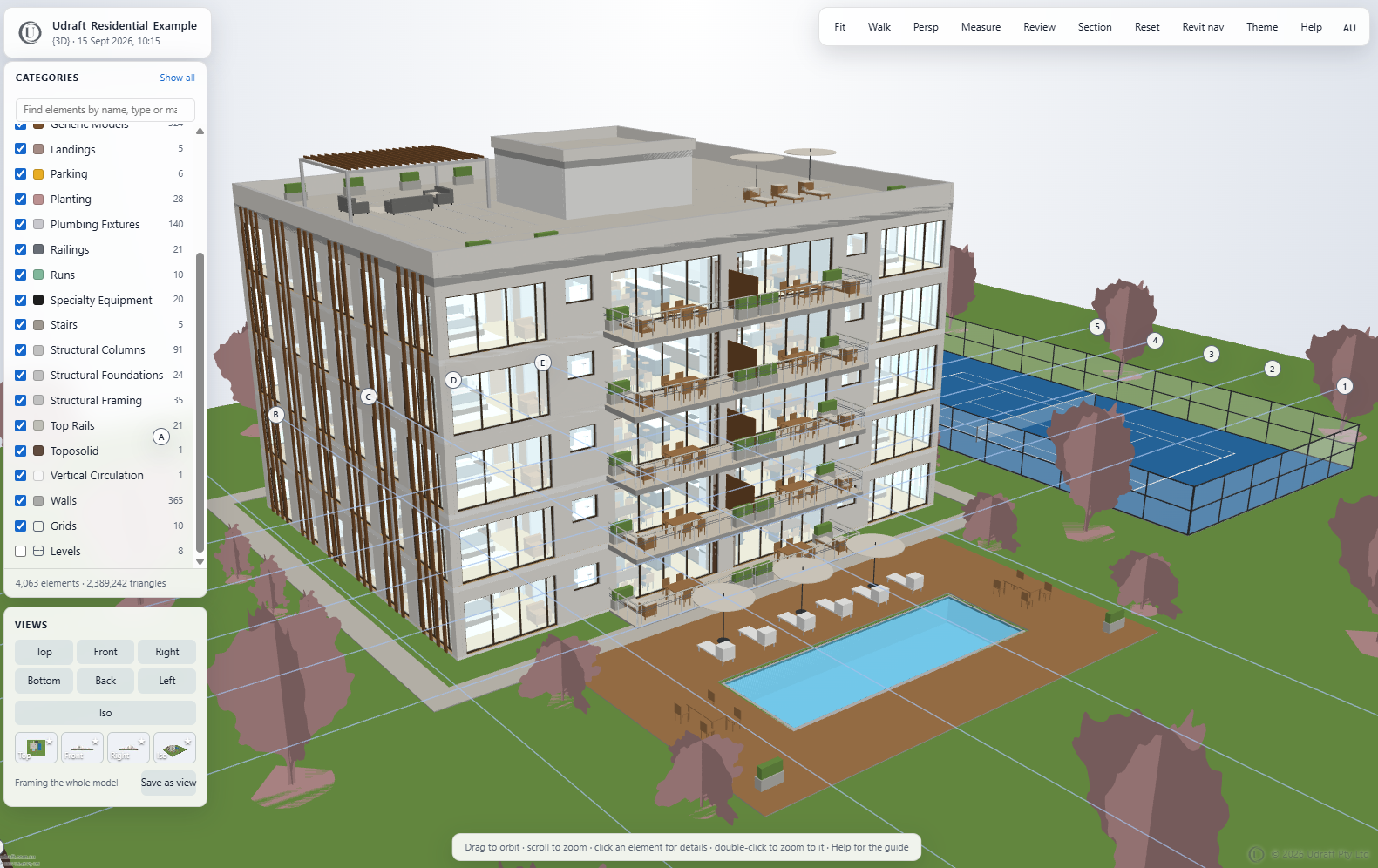
- The full model with element properties, measuring, sections, walk-through and saved views.
- A review panel: pinned comments and markups they can export as a report and send back.
What you keep
- The model file itself never goes to the client, only the viewer built from it.
- With the Revit add-in the model never leaves your PC at all; see security.
- No hosting, no subscription for the client, nothing to switch off when the project ends.
How it works
- Drop the file on the Create page. No account is needed for the open formats; Revit, DWG and Navisworks need an account with tokens.
- A minute or so later you download one HTML file. That file is the whole viewer: the geometry, the properties, the tools.
- Send it. It opens in any modern browser, on a laptop, a tablet or a phone, with nothing to install and no login. It works with the internet switched off.
What the person you send it to can do
- Orbit, pan and zoom; select elements and read their properties.
- Measure distances, angles and diameters with snapping.
- Cut sections, walk through at eye height, save views.
- Pin comments and markups, then export a review report or spreadsheet back to you.
Examples
Made by the service. Open the viewer in a new tab, or download it beside the model it came from.
Try it on your own model
Open formats convert free with no account; Revit, DWG and Navisworks need an account with tokens. One self-contained HTML file: nothing to install, nothing to host, works offline, small enough to email.
More guides
Revit viewer: share an RVT model as one HTML file
Upload the .rvt, or export from inside Revit with the add-in so the model never leaves your PC. Either way the result is…
IFC viewer online, free: one HTML file, no install
IFC is the format everyone can export and nobody can open without another install. Drop it here and get one HTML file ba…
DWG viewer: send a drawing as an interactive 3D file
The person you send a drawing to should not need AutoCAD to look at it. A DXF converts free; a DWG is converted through …
Navisworks viewer: share a coordination model as one HTML file
Publish from inside Navisworks Manage or Simulate with the add-in, so the model never leaves your PC, or upload an .nwc.…
Point cloud viewer: share a scan as one HTML file
A surveyor's scan should not need the surveyor's software to look at. Drop the .e57 or .las here and get one HTML file b…
Convert RVT to an HTML viewer
Not a screenshot, not a link: the Revit model itself as one HTML file, geometry and properties included.
Autodesk Viewer alternative: an offline file instead of a cloud link
Hosted viewers and Udraft 3D solve the same problem in opposite ways. This page sets out the difference plainly so you c…